


1. Arbitrage là gì?
Arbitrage (giao dịch chênh lệch giá) là việc tận dụng sự khác biệt về giá của cùng một tài sản trên các thị trường khác nhau để tạo ra lợi nhuận. Đây thường được xem là một chiến lược đầu tư rủi ro thấp, thường được thực hiện thông qua phòng ngừa rủi ro (hedging) hoặc hoán đổi (swapping). Trong thị trường tiền mã hóa, các hình thức arbitrage phổ biến bao gồm: Arbitrage Tỷ lệ Funding, Arbitrage Chênh lệch Giá Hợp đồng Tương lai - Spot, Arbitrage Chênh lệch Giá Spot - Spot và Arbitrage Chênh lệch Giá Hợp đồng Tương lai - Hợp đồng Tương lai.
Arbitrage Tỷ lệ Funding: Mua tài sản trên thị trường spot đồng thời bán khống cùng một lượng tài sản đó trên thị trường hợp đồng tương lai để phòng ngừa rủi ro, từ đó nhận được lợi nhuận từ tỷ lệ funding của giao dịch hợp đồng tương lai vĩnh cửu.
Arbitrage Chênh lệch Giá Hợp đồng Tương lai - Spot: Khi giá hợp đồng tương lai cao hơn giá spot, nhà đầu tư có thể mua tiền mã hóa trên thị trường spot và bán khống cùng số lượng hợp đồng trên thị trường hợp đồng tương lai giao hàng. Khi chênh lệch giá giữa hai thị trường thu hẹp hoặc biến mất, nhà đầu tư có thể đóng vị thế để chốt lợi nhuận.
Arbitrage Chênh lệch Giá Spot - Spot: Tận dụng sự chênh lệch giá giữa các sàn giao dịch khác nhau bằng cách mua giá thấp tại một sàn và bán giá cao tại sàn khác.
Arbitrage Chênh lệch Giá Hợp đồng Tương lai - Hợp đồng Tương lai: Kiếm lợi nhuận từ chênh lệch giữa các hợp đồng của cùng một tài sản nhưng có ngày đáo hạn khác nhau.
2. Ưu điểm của Bot Arbitrage Chênh lệch Giá Liên sàn của Gate là gì?
Gate cung cấp một bot arbitrage chênh lệch giá liên sàn, hỗ trợ giao dịch arbitrage giữa các nền tảng khác nhau. So với các sản phẩm chỉ giới hạn trong một sàn, bot này giúp bạn nắm bắt nhiều cơ hội arbitrage hơn và xây dựng các danh mục arbitrage tối ưu.
- Arbitrage Liên sàn: Tạo danh mục arbitrage linh hoạt giữa Gate, Binance và OKX, tận dụng nhiều cơ hội hấp dẫn hơn.
- Danh mục Arbitrage Tối ưu: Kết hợp tài sản từ nhiều nền tảng để xác định các kịch bản arbitrage sinh lời nhất.
- Theo dõi Thực tế: Giám sát vị thế và trạng thái số dư arbitrage của bạn theo thời gian thực, giúp quản lý rủi ro hiệu quả.
3. Bot hoạt động như thế nào?
Arbitrage chênh lệch giá liên sàn là chiến lược mà một chân là thị trường spot và chân còn lại là thị trường hợp đồng tương lai. Bot này tận dụng sự chênh lệch giá giữa thị trường spot và hợp đồng tương lai trước thời điểm đáo hạn. Theo xu hướng thị trường, giá hợp đồng tương lai thường có xu hướng hội tụ về giá spot trước ngày đáo hạn. Bằng cách tận dụng nguyên lý này, nhà giao dịch có thể mua tài sản spot với giá thấp hơn và bán hợp đồng tương lai với giá cao hơn khi chênh lệch giá đủ lớn. Khi chênh lệch giá thu hẹp lại, họ có thể đóng vị thế để hiện thực hóa lợi nhuận từ khoản chênh lệch này.
Ví dụ:
Giả sử BTC: giá cuối cùng của BTCUSDT spot là 62.000 USDT, trong khi giá cuối cùng của hợp đồng tương lai BTCUSDT quý đáo hạn ngày 27 tháng 9 là 65.000 USDT. Chênh lệch giữa spot và hợp đồng tương lai là 65.000 - 62.000 = 3.000 USDT. Nếu một trader mua 1 BTC trên thị trường spot và bán 1 BTC trên thị trường hợp đồng tương lai, trader sẽ chi 62.000 USDT để mua spot và sử dụng 65.000 USDT làm ký quỹ cho hợp đồng tương lai (giả định đòn bẩy 1x và chưa tính phí giao dịch).
Tại thời điểm đáo hạn, nếu chênh lệch giá tiến về 0 và cả hai chân đều có giá mới là 68.000 USDT, vị thế spot sẽ lãi 68.000 - 62.000 = 6.000 USDT, trong khi vị thế hợp đồng tương lai sẽ lỗ 68.000 - 65.000 = 3.000 USDT. Như vậy, tổng lợi nhuận từ cả hai chân là 6.000 - 3.000 = 3.000 USDT. Ngược lại, nếu giá cuối cùng của cả hai chân giảm xuống 58.000 USDT, vị thế spot sẽ lỗ 62.000 - 58.000 = 4.000 USDT, trong khi vị thế hợp đồng tương lai sẽ lãi 65.000 - 58.000 = 7.000 USDT, tổng lợi nhuận là 7.000 - 4.000 = 3.000 USDT.
4. Cách sử dụng Bot?
Bước 1: Mở trang giao dịch Spot trên web, nhấp vào nút "Bots" ở góc trên bên phải và chọn "Arbitrage Liên sàn" trong danh sách bot để bắt đầu giao dịch.
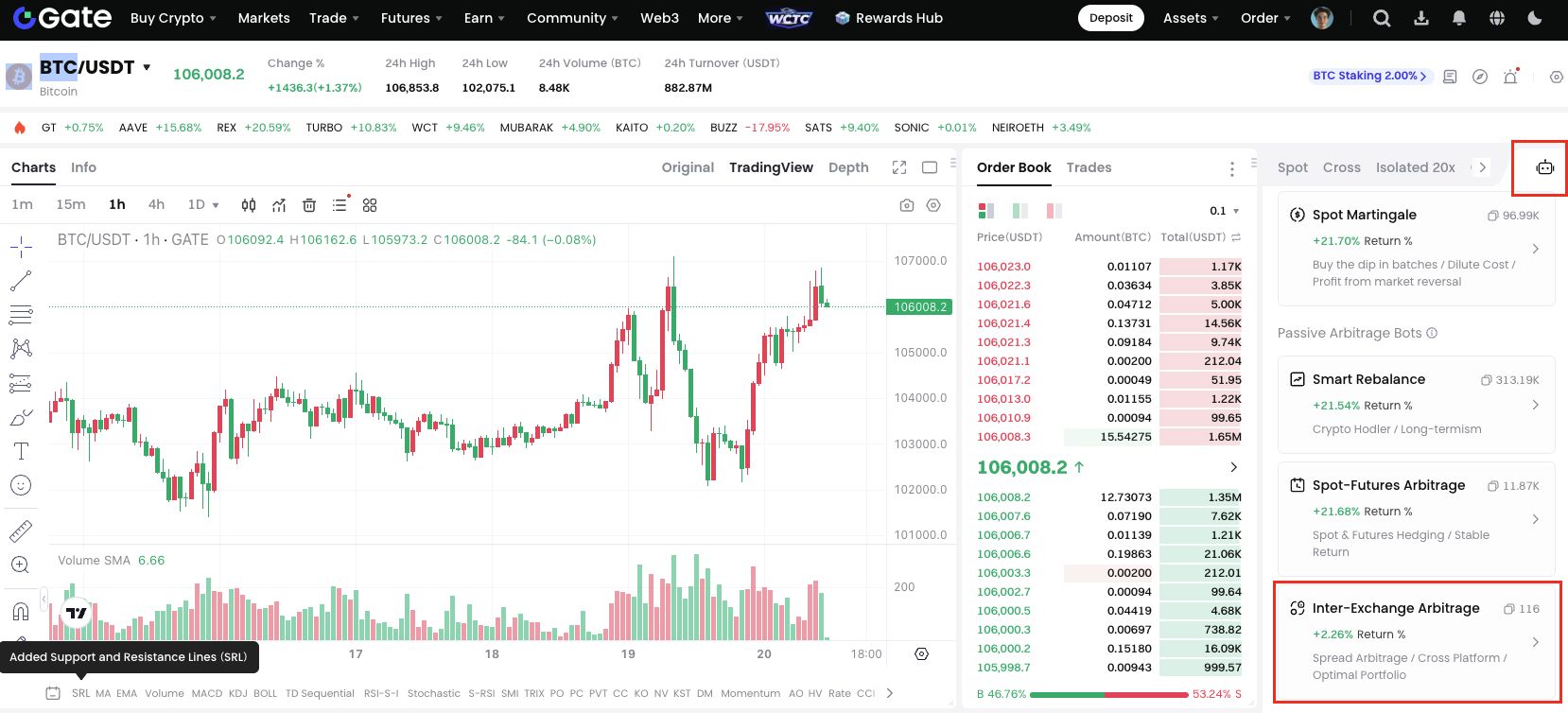
Bước 2: Chọn danh mục arbitrage yêu thích.
Trang được chia thành năm khu vực, sắp xếp từ trên xuống dưới và từ trái sang phải: khu vực thông tin trên cùng, khu vực chọn danh mục arbitrage, khu vực biểu đồ nến, khu vực đặt lệnh và khu vực lệnh. Ở khu vực chọn danh mục arbitrage, bạn có thể chọn danh mục phù hợp. Các chỉ số chính để đánh giá lợi nhuận của một danh mục arbitrage là tỷ lệ chênh lệch giá (spread rate) và APR. Tỷ lệ chênh lệch giá càng cao thì tiềm năng lợi nhuận càng lớn. Tuy nhiên, một số danh mục arbitrage có thể có tỷ lệ chênh lệch cao nhưng yêu cầu thời gian nắm giữ lâu hơn, vì vậy bạn nên cân nhắc thêm chỉ số APR.
Bước 3: Nhập số tiền đầu tư.
Tại khu vực lệnh, số tiền đầu tư tối đa sẽ được tính dựa trên số lượng tiền mã hóa cần thiết cho cả hai chân của lệnh. Lưu ý rằng số tiền bạn nhập không được vượt quá số tiền đầu tư tối đa. Trong quá trình nhập số tiền, bạn có thể kiểm tra số dư khả dụng của tài khoản tương ứng. Nếu bạn đặt lệnh trên thị trường hợp đồng tương lai, số dư khả dụng sẽ là số dư trong tài khoản hợp đồng tương lai.
Đối với arbitrage hợp đồng tương lai - spot trên thị trường hợp đồng tương lai USDT, khoản đầu tư sẽ tính bằng USDT.
Nếu bạn chưa thêm tài khoản giao dịch của sàn khác cho danh mục arbitrage, bạn sẽ không thể tạo bot. Vui lòng làm theo hướng dẫn để thêm tài khoản giao dịch cần thiết.
Sau khi nhấn "Tạo", bot sẽ đồng thời đặt lệnh trên cả hai sàn. Có thể mất một chút thời gian để cân bằng khối lượng vị thế của hai chân. Do các yếu tố như biến động giá, phí giao dịch, v.v., số lượng khớp lệnh thực tế có thể hơi khác so với khoản đầu tư ban đầu của bạn.
Bước 4. Theo dõi và Quản lý Bot
- Theo dõi Bot của bạn
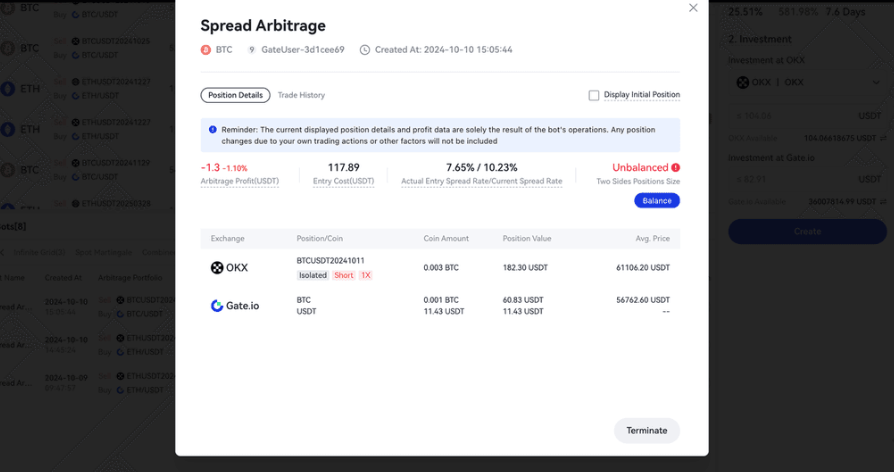
Tại khu vực lệnh, bạn có thể nhấp vào "Bots" để xem chi tiết các bot arbitrage đang hoạt động, bao gồm thông tin vị thế, lợi nhuận, trạng thái số dư và lịch sử giao dịch.
- Thông tin Vị thế: Bot sẽ đồng bộ dữ liệu giao dịch theo thời gian thực từ cả hai tài khoản. Nếu bạn thay đổi khối lượng vị thế, thông tin này cũng sẽ được cập nhật.
- Hiển thị Vị thế Ban đầu: Tính năng này giúp bạn nhanh chóng kiểm tra khối lượng vị thế ban đầu và trạng thái lợi nhuận hiện tại. Sau khi chọn, hệ thống sẽ hiển thị khối lượng vị thế ban đầu, không thay đổi khi vị thế của bạn thay đổi.
- Lịch sử Giao dịch: Lịch sử giao dịch arbitrage của bot sẽ được hiển thị tại đây.
- Quản lý Bot của bạn
Trước khi hợp đồng trong danh mục arbitrage đến ngày giao hàng, bạn có thể chấm dứt bot bất cứ lúc nào. Khi chấm dứt, bạn có thể chọn đóng vị thế hoặc giữ nguyên vị thế. Nếu chọn đóng vị thế, bot sẽ đóng tất cả vị thế ở cả hai tài khoản. Nếu không đóng, bạn có thể tự quản lý thủ công.
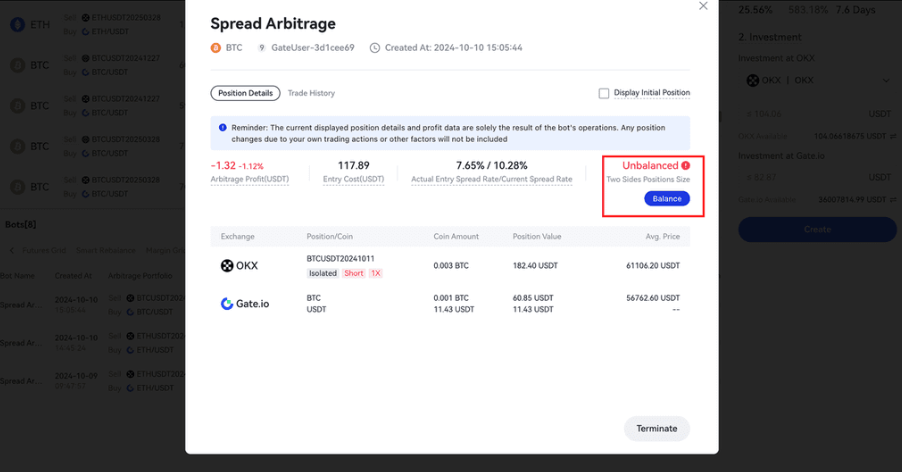
Khi khối lượng vị thế ở hai tài khoản không cân bằng, bạn có thể chọn nút "Cân bằng", bot sẽ đóng vị thế ở tài khoản có khối lượng lớn hơn.
Bước 5: Chấm dứt Bot
Có bốn cách để chấm dứt bot:
- Chủ động chấm dứt bot.
- Hợp đồng trong danh mục arbitrage đến ngày giao hàng, bot sẽ tự động chấm dứt.
- Trong quá trình hoạt động, bot sẽ theo dõi tỷ lệ chênh lệch giá. Khi tỷ lệ này tiến gần về 0, bot sẽ chấm dứt và đóng vị thế để hiện thực hóa lợi nhuận.
Lưu ý: Nếu vị thế trong danh mục arbitrage giảm do các hành động giao dịch của bạn (như mua/bán, chuyển khoản, rút tiền) hoặc do các thao tác của sàn (như auto-deleveraging), bạn sẽ cần tự xử lý vị thế này, bot sẽ không thực hiện thay bạn.
Gate bảo lưu quyền giải thích cuối cùng về sản phẩm.
Để được hỗ trợ thêm, vui lòng truy cập trang hỗ trợ chính thức của Gate hoặc liên hệ đội ngũ chăm sóc khách hàng của chúng tôi.
Miễn trừ trách nhiệm
Nội dung được cung cấp ở đây chỉ mang tính chất tham khảo và cung cấp kiến thức, không cấu thành bất kỳ lời khuyên tài chính, đầu tư, giao dịch hoặc pháp lý nào, cũng như không phải là lời đề nghị hoặc lời mời mua hoặc bán bất kỳ tài sản kỹ thuật số nào. Gate không đưa ra bất kỳ tuyên bố hoặc bảo đảm nào, dù rõ ràng hay ngụ ý, về tính chính xác, đầy đủ hoặc kịp thời của thông tin được cung cấp ở đây. Các tính năng sản phẩm, giao diện, quy tắc và cấu trúc phí có thể được cập nhật hoặc điều chỉnh bất cứ lúc nào. Vui lòng tham khảo các thông báo mới nhất và thông tin thực tế được hiển thị trên nền tảng Gate để biết chi tiết chính xác nhất.
Đầu tư vào tài sản kỹ thuật số tiềm ẩn rủi ro đáng kể và giá cả có thể biến động mạnh. Bạn có thể mất toàn bộ số tiền đầu tư. Vui lòng đưa ra quyết định thận trọng dựa trên tình hình tài chính và khả năng chấp nhận rủi ro của riêng bạn sau khi hiểu đầy đủ các rủi ro liên quan. Nếu cần, bạn nên tham khảo ý kiến của cố vấn tài chính hoặc pháp lý chuyên nghiệp độc lập.
Để biết thêm thông tin về các rủi ro tiềm ẩn, vui lòng tham khảo Tuyên bố về Rủi ro và Thỏa thuận Người dùng của Gate.
