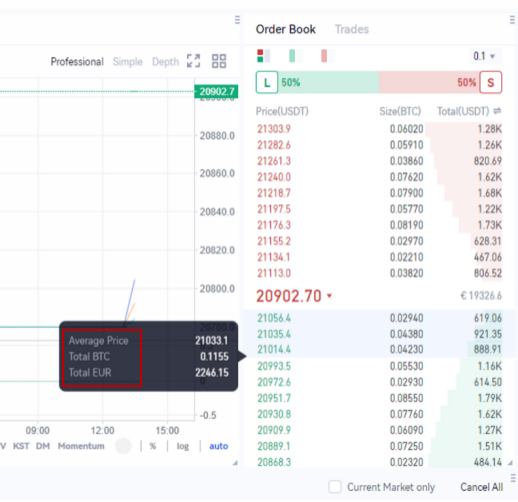
| Cos'è un Order Book?
· Un Order Book è un registro digitale degli ordini di acquisto e vendita per uno specifico asset, organizzato per livello di prezzo. Mostra in tempo reale le offerte di acquisto (bids) degli acquirenti, le richieste di vendita (asks) dei venditori e le rispettive quantità. Il numero di ordini a ciascun livello di prezzo è noto come profondità di mercato, e i dati dell’order book sono fondamentali per i trader nell’analisi degli investimenti.
· L’order book di Gate è suddiviso in quattro sezioni: Long VS Short, Bids, Asks e Trades.
· Long VS Short: Questa sezione mostra il sentiment di mercato verso uno specifico asset, basandosi sulle statistiche in tempo reale dei prestiti per il margin trading, e può essere utilizzata come riferimento.
· Bids: Un elenco degli ordini di acquisto con i relativi prezzi e quantità.
· Asks: Un elenco degli ordini di vendita con i relativi prezzi e quantità.
· Trades: Questa sezione mostra le ultime operazioni concluse sul mercato, combinando sia ordini di acquisto che di vendita.
|Nota: I dati dell’order book vengono aggiornati in tempo reale e rappresentano una fonte preziosa di informazioni per i trader che desiderano prendere decisioni consapevoli.

· I dati dell’order book sono una risorsa preziosa per i trader, in quanto aumentano la trasparenza del mercato mostrando in tempo reale il sentiment e la propensione al trading degli operatori. Queste informazioni sono fondamentali per l’analisi degli investimenti.
· Tuttavia, è importante notare che i dati dell’order book sono in costante cambiamento, rendendoli più adatti all’analisi a breve termine piuttosto che all’analisi delle tendenze di lungo periodo. I trader dovrebbero tenere presente questo aspetto quando utilizzano i dati dell’order book per orientare le proprie decisioni di investimento.
| Funzioni dell’Order Book
Gate offre le seguenti funzioni aggiuntive per permettere agli utenti di effettuare analisi.
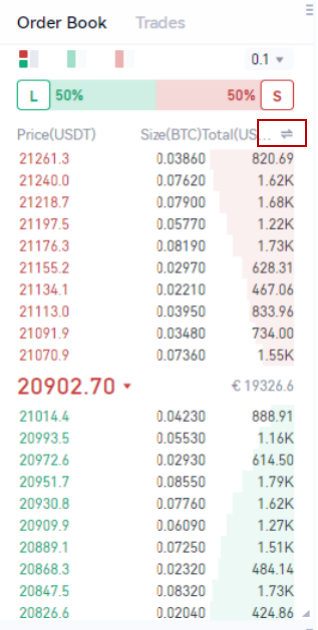
· Cambio Modalità di Visualizzazione
· Puoi alternare tra diverse modalità di visualizzazione cliccando sulla doppia freccia situata nell’angolo in alto a destra.
· Ad esempio, quando visualizzi la coppia di trading BTC/USDT, hai la possibilità di mostrare la size (BTC) e il totale (USDT) di ogni operazione, oppure di visualizzare la somma (BTC) e la somma (USDT) di ciascun livello di prezzo. Questo ti consente di personalizzare la visualizzazione in base alle tue esigenze e preferenze.
· Visualizzazione al Passaggio del Mouse
· Quando passi il cursore su un determinato numero di ordini, verrà mostrato il prezzo medio di quegli ordini, insieme al totale nella valuta base e al totale nella valuta di quotazione, per tuo riferimento.
· Questa funzione ti permette di visualizzare rapidamente e facilmente informazioni chiave su un gruppo di ordini, aiutandoti a prendere decisioni di trading più informate.