
| Come verificare la cronologia degli ordini su Gate
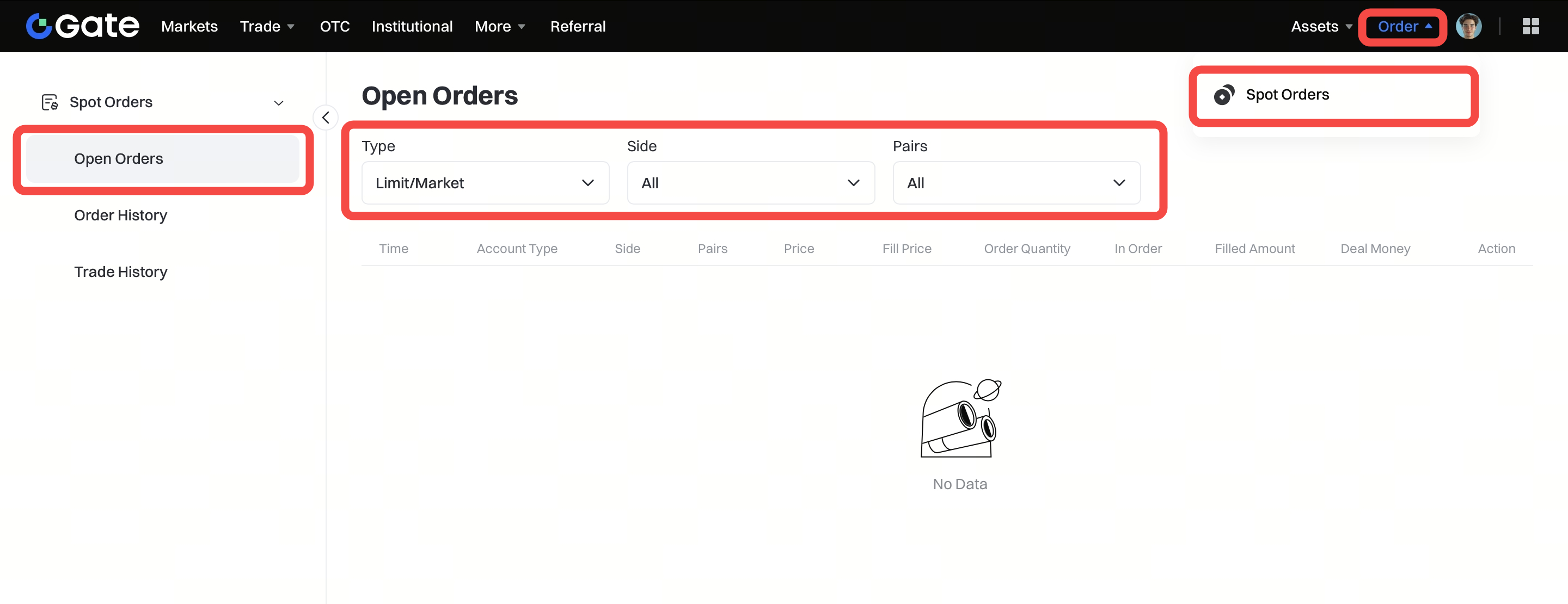
Passaggio 1: Accedi al tuo account Gate. Clicca su "Ordine" - "Ordini Spot".
Passaggio 2: Scegli tra "Ordini aperti", "Cronologia ordini" e "Cronologia trade" (ordini eseguiti). Poi seleziona il tipo di ordine, la coppia e l’intervallo di tempo. Clicca su "Filtra" per applicare i filtri e avviare la ricerca.
| Nota:
- Gli ordini non hanno limiti di tempo e vengono eseguiti non appena i prezzi corrispondono.
- Un ordine limite verrà eseguito solo quando il prezzo di mercato corrisponde al prezzo impostato. Se il prezzo di mercato non corrisponde al prezzo impostato, l’ordine rimarrà in sospeso. Gli utenti possono annullare gli ordini in sospeso in qualsiasi momento, senza alcuna commissione.
- Dopo l’annullamento di un ordine, i fondi verranno restituiti all’account dell’utente e potranno essere verificati nel saldo e nella cronologia delle transazioni.
- Nota che, quando il prezzo di acquisto impostato è superiore al prezzo di mercato, l’ordine limite verrà eseguito al miglior prezzo di mercato disponibile; analogamente, quando il prezzo di vendita impostato è inferiore al prezzo di mercato, l’ordine limite verrà anch’esso eseguito al miglior prezzo di mercato disponibile.
