
| Definition of Spot Trading · Spot trading refers to the exchange of one cryptocurrency for another, using the current market price. The trading process is based on the principles of price and time priority, with orders being matched and settled between different crypto assets. For instance, BTC/USDT represents the exchange of USDT for BTC.
· A Limit Order allows users to set specific buying and selling prices. The order will only be executed when the market price matches the set price. If the market price does not match the set price, the limit order will remain pending. It's important to note that when the set buying price is higher than the market price, the limit order will be settled at the best available market price. Similarly, when the set selling price is lower than the market price, the limit order will also be settled at the best available market price.
· A Market Order, on the other hand, is an order that is executed immediately at the best available market price.
· An Iceberg Order is a type of limit order that allows users to conceal the real order amount, only showing a portion of the order on the public order book. The hidden portion of the order will be filled first and will be charged a trading fee of 0.2%. The visible portion of the order will be charged the normal trading fee. If the filled amount consists of both the hidden and the visible, the trading fee will be charged at 0.2%.
· Lastly, an IOC (Immediate or Cancel) order attempts to fill the entire or a portion of the order immediately at the available price and amount. Any unfilled portion of the order will be cancelled.
| Trading Page
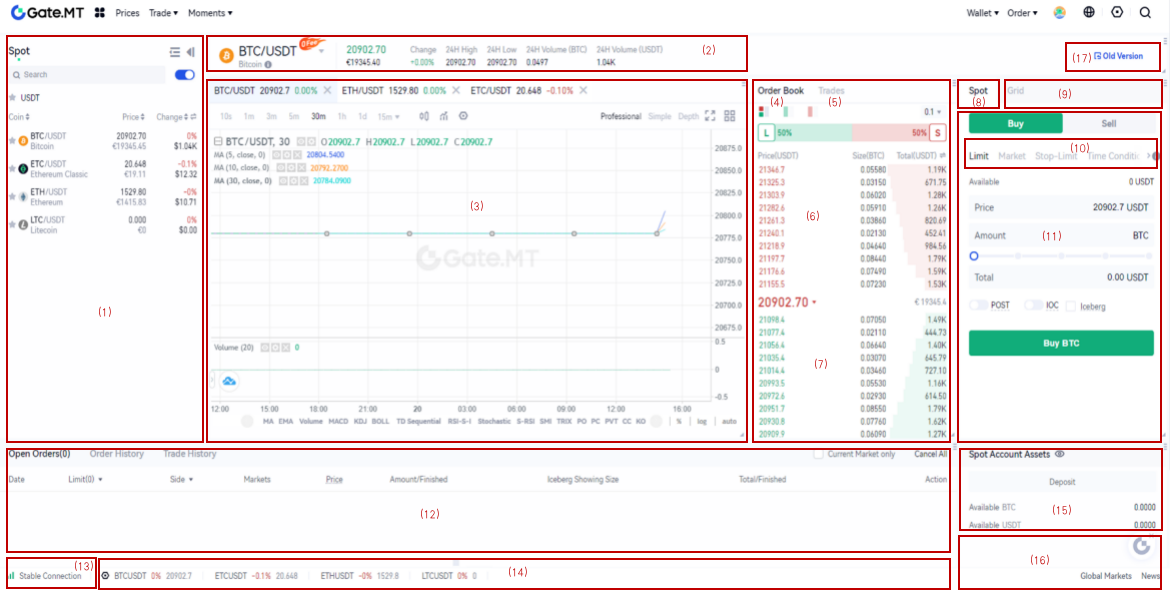 (1)– Markets
(2)– 24-hour trading statistics of the pair
(3)– Candlestick chart and technical analysis tools
(4)– Order Book
(5)– Newest Trades
(6)– Selling Orders (Ask)
(7)– Buying Orders (Bids)
(8)– Spot Trading
(9)– Grid Trading
(10)– Conditional orders: “Limit”, “Market”, “Spot-Limit”, “Time Condition”, “Trailing Reversal Order”, “Loop Order” are included in this section
(11)– Placing Order Section
(12)– Order Section: “Open Orders”, “Order History”, “Trade History”, are included in this section. You can check the details of all your orders here.
(13)– Internet Connection
(14)- A fast preview of different trading pairs
(15)– Assets Section
(16)– Global markets, news, chatroom, online customer support, submit request, satisfaction survey
(17)- Click this button to go back to the previous version of spot trading
(1)– Markets
(2)– 24-hour trading statistics of the pair
(3)– Candlestick chart and technical analysis tools
(4)– Order Book
(5)– Newest Trades
(6)– Selling Orders (Ask)
(7)– Buying Orders (Bids)
(8)– Spot Trading
(9)– Grid Trading
(10)– Conditional orders: “Limit”, “Market”, “Spot-Limit”, “Time Condition”, “Trailing Reversal Order”, “Loop Order” are included in this section
(11)– Placing Order Section
(12)– Order Section: “Open Orders”, “Order History”, “Trade History”, are included in this section. You can check the details of all your orders here.
(13)– Internet Connection
(14)- A fast preview of different trading pairs
(15)– Assets Section
(16)– Global markets, news, chatroom, online customer support, submit request, satisfaction survey
(17)- Click this button to go back to the previous version of spot trading
| How to Conduct Spot Trading
Step 1: Log in to your account. Click on “Spot” under “Trade” on the top navigation bar.

Step 2: Search and enter the pair you want to trade in the Market section on the left.

Step 3: Set buying/selling prices and buying/selling amount/total in the placing order section on the right. Then click on “Buy”/ “Sell”.

Step 4: Click on the latest trades on the order book to set the buying/selling price conveniently.
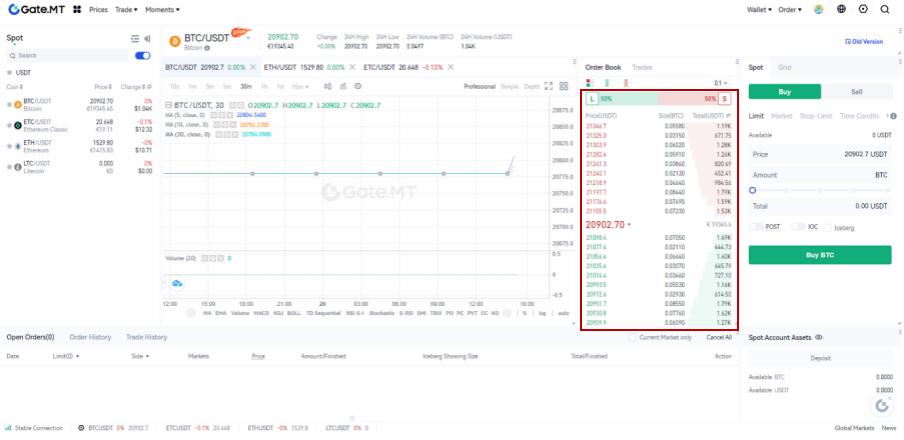 You can also place a market order. Enter the amount and click on “Buy”/ “Sell”.

Step 5: Confirm the price and amount. Then click on “Confirm Order”.

Step 6: After successfully placing an order, you will be able to view it in the order section. You can also cancel the order here by clicking on “Cancel”.

