
1. I miei fondi non arrivano.
· Quando viene richiesta un’operazione di prelievo, questa passa attraverso tre fasi chiave: Richiesta, Validazione e Ricezione dei Fondi.
-
· Richiesta: Se lo stato del tuo prelievo indica "Prelievo completato" o "Blocco confermato", significa che la transazione è stata elaborata da Gate ed è stata inviata alla rete blockchain per la validazione.
-
· Validazione: Per monitorare lo stato della transazione, puoi copiare il TXID della transazione e utilizzarlo su un blockchain explorer (https://www.blockchain.com/explorer).
-
· Ricezione dei Fondi: Se la rete blockchain indica che i fondi non sono ancora arrivati, è importante attendere pazientemente che la rete validi la transazione. Se i fondi risultano ricevuti ma non ne vedi traccia, contatta la piattaforma destinataria per assistenza.
2. Come posso controllare l’avanzamento di un prelievo di criptovaluta su un blockchain explorer?
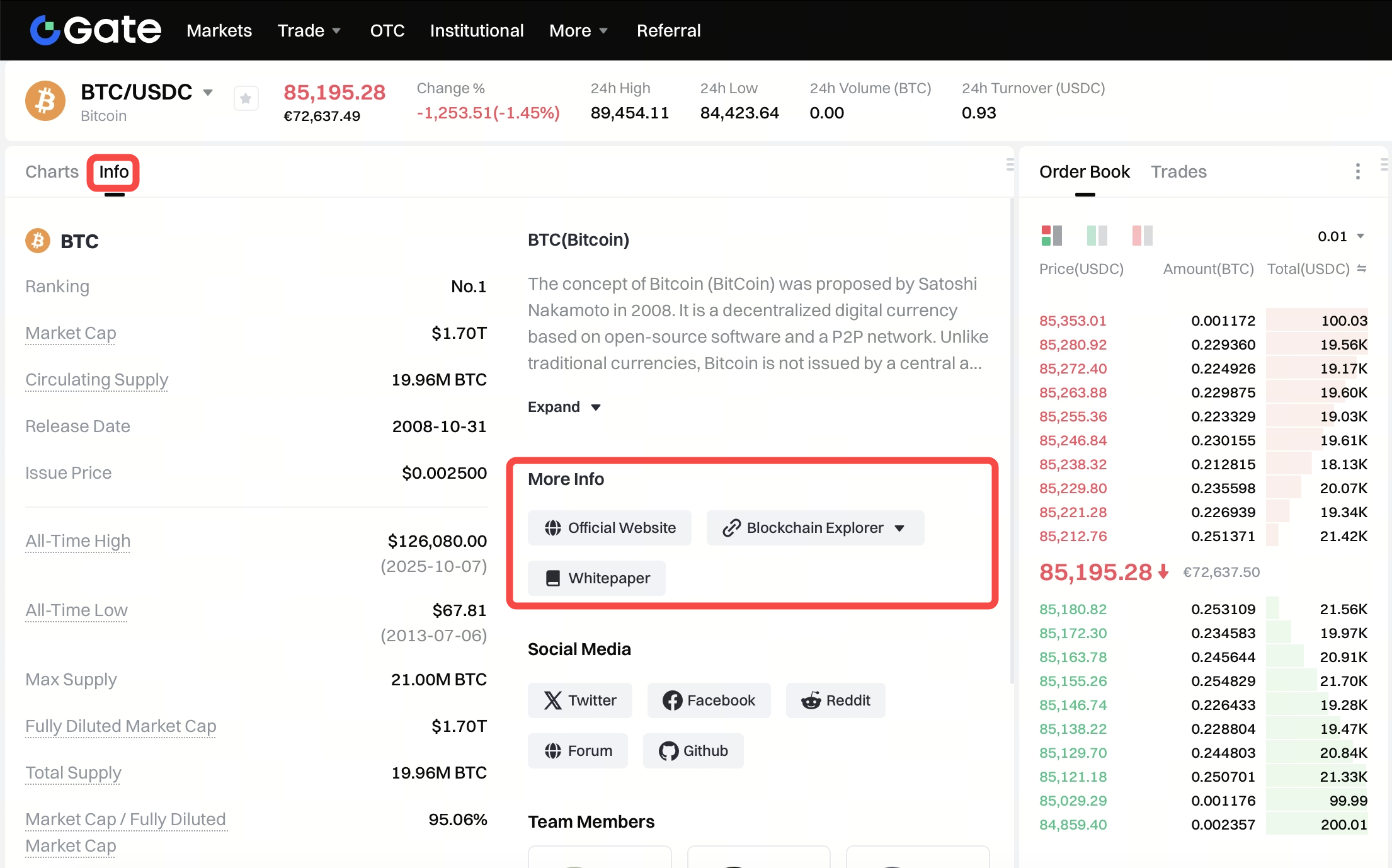
· Accedi al sito di Gate, scorri verso il basso fino a Mercati nella "Lista delle Coin", clicca su “Cerca” nelle “Ricerche Popolari” e seleziona “Altro”.

· Seleziona/cerca la coin che desideri prelevare, clicca su "info" per aprire la pagina della coin. Incolla il TXID nella barra di ricerca.
3. Indirizzo di prelievo errato
· Se un prelievo fallisce a causa dell’utilizzo di un indirizzo errato, i fondi verranno restituiti automaticamente e la registrazione del prelievo sarà contrassegnata come "Annullata".
· Se il prelievo va a buon fine, i fondi saranno trasferiti al wallet del destinatario.
| Nota: A causa della natura irreversibile delle transazioni blockchain, non possiamo aiutarti a recuperare i fondi una volta che la transazione è stata completata. In questo caso, dovrai contattare direttamente il destinatario per cercare una soluzione.
4. Cause comuni di fallimento dei prelievi
· Di seguito sono riportate quattro cause comuni di fallimento dei prelievi:
-
- · Indirizzo errato
-
- · Lunghezza dell’indirizzo errata
-
- · Ritardo della rete
· Per determinare la causa di una transazione fallita, puoi visualizzare il dettaglio del fallimento nella pagina dei dettagli della transazione. Verifica che l’indirizzo sia stato copiato interamente, che sia stata selezionata la coin corretta, che non ci siano simboli o spazi indesiderati e che Mainnet e Token Contract Address siano supportati.
· Se il problema non è legato alle cause sopra menzionate, i fondi verranno restituiti al conto del mittente dopo il fallimento del prelievo. Se i fondi non sono stati restituiti dopo 24 ore, contatta il servizio clienti inviando un’email a support@gatemt.com per assistenza.
5. Mancata verifica dell’identità KYC
· Gate richiede a tutti gli utenti di completare la verifica dell’identità KYC per rispettare le normative del settore delle criptovalute, garantire la sicurezza dei fondi degli utenti e ridurre rischi come riciclaggio di denaro, estorsioni e altre attività illegali. Solo dopo aver completato la verifica KYC sarà possibile effettuare determinate operazioni, come il prelievo.
6. Account in modalità Protezione
· Dopo aver apportato modifiche alle impostazioni di sicurezza come verifica KYC, Google Authenticator, numero di telefono, ecc., non sarà possibile prelevare fondi per un periodo di 24 ore dalla modifica. Questo serve a garantire la sicurezza del tuo account durante questo periodo di protezione di 24 ore.
· Se il periodo di protezione supera le 24 ore, contatta il servizio clienti inviando un’email a support@gatemt.com per assistenza.
7. La valuta prelevata non è supportata dalla piattaforma destinataria.
· Sebbene Gate possa confermare se il formato dell’indirizzo è corretto, non può garantire che la piattaforma destinataria supporti la valuta prelevata. Per risolvere questo problema, è necessario comunicare con la piattaforma destinataria.
Se la piattaforma destinataria accetta di restituire i fondi sul tuo account Gate, puoi fornire loro il tuo codice di deposito Gate.
· Se la piattaforma destinataria accetta di restituire i fondi all’indirizzo mittente e non è possibile trasferirli direttamente sul tuo account Gate, puoi richiedere il TXID della transazione alla piattaforma destinataria. Successivamente, puoi inviare un’email di assistenza (support@gatemt.com) a Gate fornendo ai nostri operatori il TXID, una prova della comunicazione con la piattaforma destinataria, il tuo ID account Gate e il tuo codice di deposito. I nostri operatori ti assisteranno nel trasferimento dei fondi sul tuo account Gate.
· Se la piattaforma destinataria ha altre soluzioni che richiedono il nostro intervento, contatta il servizio clienti inviando un’email a support@gatemt.com per informarci della situazione.
